Typesetting astrology with LaTeX

2 May 2008 - updated 30 August 2008
Tags for this page: 200805 200808 astrology latex software
[Site traffic Strip-O-Meter]

Click to censor the Strip-O-Meter.

Resources for typesetting astrological documents with LaTeX. NEW:  new release of my "horoscop" package for typesetting wheel charts, with some features fixed and bugs added.

horoscop v0.91

This is the latest beta release of horoscop, a LaTeX package for typesetting wheel charts.  I'm posting the beta version 0.91 here only; my plan is that after people have had a chance to take a look at it and give some feedback, I'll put together a more final package which will be 1.0 and released through CTAN. If this package interests you, please do both look at it yourself and encourage others to do so.  It was initially designed with my own needs in mind, but I'd like to make it relevant to other users too.  Summary of features:

  • A unified interface for astrological symbols/glyphs, supporting three different astrological fonts as well as text abbreviations. 
  • Support for invoking Astrolog or Swiss Ephemeris to calculate charts.  Positions can also be specified manually. 
  • Loading and saving object and cusp positions into TeX macros. 
  • Typesetting of angles and positions as text. 
  • Ready-made templates for basic wheel charts, dial charts including multi-dials with up to four sets of objects, and decorative wheel charts. 
  • Optional variations of the standard templates:  aspect webs, highlighting for angular cusps, choice of what to include in object labels, house labels inside the houses. 
  • Low-level graphics functions for plotting in polar coordinates and building new templates. 
  • Labels move, and where necessary houses expand, to prevent crowding. 
  • NEW - smart rounding of angles for display.

Documentation of the package, including extensive examples and implementation details, is available in a 126-page PDF file.  The package itself is available as a traditional .ins and .dtx pair, or a ready-made .sty file.  To make full use of horoscop, you will also need the starfont package below, and a working installation of either Swiss Ephemeris or Astrolog.

starfont v1.1

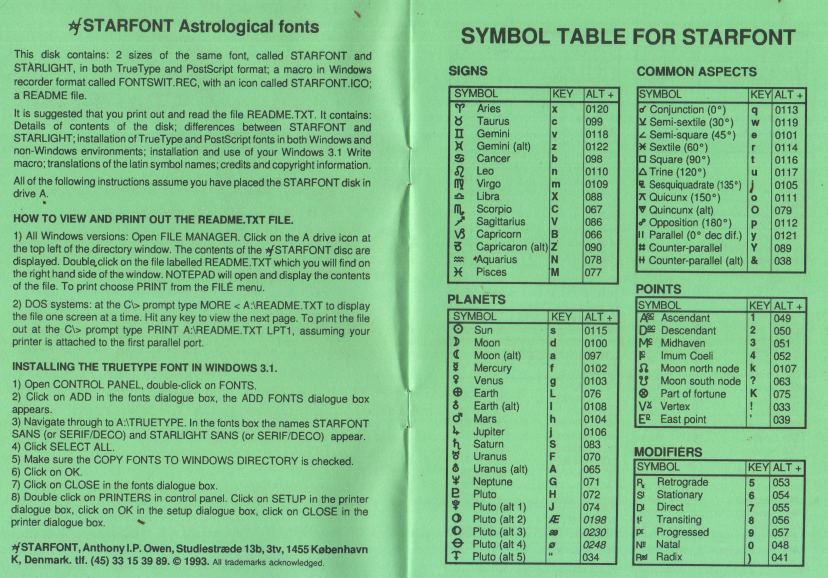
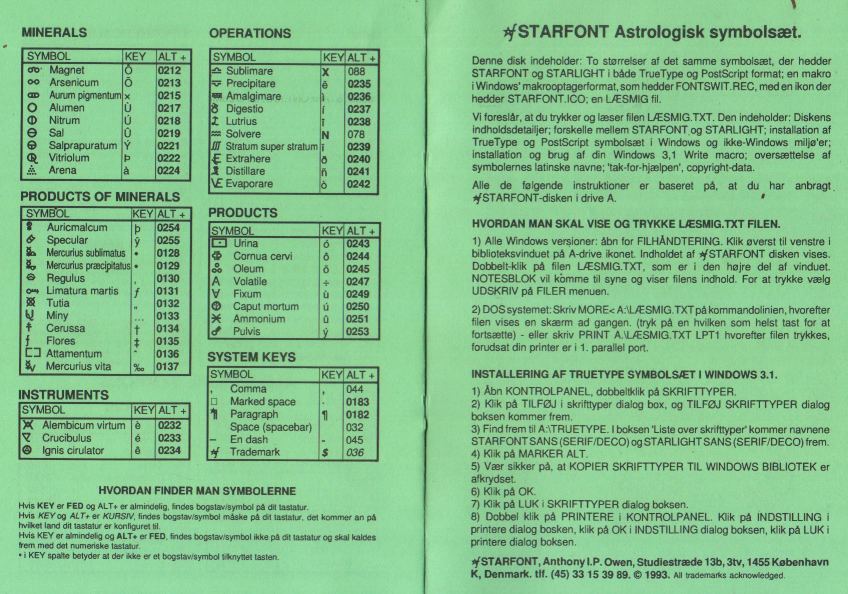
Here's a package I wrote back in 2004 called starfont, which makes Anthony Owen's popular astrological font StarFont Sans available to LaTeX. You can download a ZIP file or look at the documentation in PDF form.  Because of licensing issues, CTAN requested that I modify the package to not include the actual font.  So in 2006 I removed that, and took the opportunity to update the style file to include Uranian planets and a few other symbols.  In order to use it, you will need the files CTAN doesn't distribute:  starfont.afm and starfont.pfb.  Further explanation is in the package documentation.

Note added July 2008: You may also need a TFM file, fstr8x.tfm. This can be generated with afm2tfm from the AFM file above, but some people have complained about the absence of a pre-generated one. If you need it, there it is.

Comments

Eirik from 129.241.69.146 at Mon, 26 Jun 2006 16:34:37 +0000:
very nice starfont for latex :-)

http://finblake.home.mindspring.com/rbplanet.htm

symbols for the "uranian planets", cupido, poseidon, vulcanus ...


best regards
Eirik Moen

Norway

Matthew Skala from 67.158.78.238 at Fri, 30 Jun 2006 15:38:21 +0000:
Thanks, I've added the Uranian planet symbols in the latest update. If there's any information available on other Cosmobiology glyphs, that'd be welcome too - even if it isn't in English.

Eirik from 129.241.129.27 at Sat, 01 Jul 2006 12:43:04 +0000:
yes , some glyphs maybe for midpoint trees

http://www.wmni.net/magyan/Midpoint_tree_90.jpg

Richard from 96.226.60.66 at Tue, 19 Feb 2008 03:34:17 +0000:
Hi, I love this font. I just wanted to point out that I had to use the command:

afm2tfm starfont.afm fstr8x.tfm

and put the resulting fstr8x.tfm into the right place (texmf.local/fonts/tfm/public/starfont) in my teTeX distribution on Mac OS X before this would work for me.

Maybe in some situations this happens automagically? I am no TeX fonts expert...

Other from 67.68.39.125 at Sun, 04 May 2008 16:06:52 +0000:
Hey, awesome.

Shouldn't that be something like {$7^{\bigcirc}=4^{\Box}$; 666; \\and other nonsense}? :)

John Campbell from 76.65.58.249 at Sun, 04 May 2008 16:11:33 +0000:
A big thanks for this, Matthew! I've never really used LaTex, though I have used Lyx, which I believe is a front-end for Latex.

How have you used this package for your own needs? Is it simply to get a nice looking wheel chart for printouts, or is it to be used for desktop publishing? Also, under what circumstances would you recommend using this package?

Thanks again!

Matthew Skala from 129.97.79.144 at Mon, 05 May 2008 20:31:57 +0000:
Other: oh, probably. That can be for version 1.0, I guess.

John: My main use for it is that when I do an interpretation for someone I usually like to give them a document of maybe three to ten pages combining a couple of charts with my commentary. So I can typeset that in LaTeX and use this package to do the chart graphics. Another possibility I've toyed with, though I haven't actually got much code on this, is using it as the output end of other astrological software. It would be pretty easy to make other code export a .tex file containing the commands to drive LaTeX and this package, thus factoring the chart graphics out of whatever other stuff I want my software to do. It might work well as part of a Web-based "enter your data and get a chart" service like Astrodienst's; as you've probably noticed, their free online charts aren't as visually appealing as one might want. (Note, as I mentioned in the documentation, that any Web-based use of this with user-entered data would need stringent data sanitation; such systems are often rife with security holes if the designers don't know what they're doing.)

Like LaTeX itself, this is meant to be usable on the scale of book-length works, but I don't have any immediate plans at the moment to write one of those with horoscopes in it.

Ben from 89.27.40.80 at Sat, 23 Aug 2008 14:35:57 +0000:
Hi,

Has anyone installed starfont on a MacTeX-2007 system on Mac OS X? Any pointers welcome. I've tried to follow the instructions and directories in the readme as closely as possible, but as of yet haven't managed to get it to work... I've never tried to install a font for TeX before, so I'm something of a noob to this...

Matt from 67.158.74.7 at Sat, 23 Aug 2008 14:52:21 +0000:
Maybe you need to generate a .tfm file? See Richard's comment above - I thought that would happen automatically, but for him at least (and he's using a Mac) it had to be done by hand. I've also posted a pre-generated one (see the bit marked "note added July 2008").

Ben from 89.27.40.80 at Sat, 23 Aug 2008 17:00:42 +0000:
Ok, I got it to work. I'd edited a wrong version of updmap.cfg. >_< (If anyone's wondering, the file I edited to get it working was in the /usr/local/texlive/2007/texmf-var tree.)

updmap also complained about having the map file in an obsolete location, it's apparently supposed to be in fonts/map on my system.

Ben from 89.27.40.80 at Sat, 23 Aug 2008 22:11:17 +0000:
Moving on to horoscop.

I was trying to do a chart using Astrolog and equal houses, and was seeing some weird behaviour. All other house cusps are fine, except the 10th house cusp, which is not where it ought to be but at the midheaven! I took a look at the .hor file, and it looks like this is due to how Astrolog saves the data. There's no entry for the 10th house cusp, but in its place is an entry for midheaven. The degree for every other cusp corresponds to the correct house cusp, except for that!

Anyways, Swiss Ephemeris would probably be the better choice, but I haven't been able to build it on Mac OS X. If someone has, pointers'd be welcome.

Matt from 67.158.74.7 at Sat, 23 Aug 2008 22:26:56 +0000:
Equal houses are completely broken in version 0.9. There is a built-in assumption that the ascendant is the first house cusp and the midheaven is the tenth house cusp; for equal houses, or any other system where those assumptions aren't both correct, you will see bizarre behaviour. Swiss Ephemeris won't solve that problem.

I'm working on extending it to work with these kinds of house systems and hope that the result will be in version 0.91 and posted some time before the end of August.

Ben from 89.27.40.80 at Sat, 23 Aug 2008 23:23:44 +0000:
Ah, I'd wondered why the online chart service didn't have an equal houses option. Now I see. Here's hoping you manage to fix this!

Also, correct me if I've misunderstood this, but the Astrolog backend doesn't support MC as an extra object, right? This would be a pretty important feature when using equal houses.

Anyways, this together with Astrolog and/or other tools seems to be the only (more or less) free software astrology solution running on Mac OS X with any real potential I've encountered so far. And frankly, I'm just geeky enough to actually prefer working with LaTeX and command line tools over fancy gui apps. So thanks. :D

Ben from 89.27.40.80 at Tue, 02 Sep 2008 13:47:46 +0000:
A tip for Astrolog users adopting horoscop: You can use location information saved earlier with Astrolog's -o option by doing \renewcommand{\horoastrologopt}{-i filename} before \horocalculate. Horoscop still sends the information set with \horocalcparams (or the defaults if not set), but it seems the -i option overrides this. This way you only need to type location and time info in once, and if you do it with Astrolog instead of the LaTeX file, you can also use Astrolog's other features without having to retype the information. Not that its a huge effort to type in the time and location, but still...

Possibly a feature consideration for the future? When using the -i option, the -qa option is redundant. There could perhaps be a macro to switch between manually set parameters and loading them from a file.

Oh, one more consideration for the Astrolog backend. It seems that Lilith is only calculated if the external ephemeris files are used (set in the configuration file or run with the -b option, assuming the files are available). If the default calculation method is used, the south node is calculated instead. Maybe worth mentioning in documentation?

John from 70.63.144.235 at Fri, 24 Apr 2009 16:35:08 +0000:
I am new to latex and am having problems getting the horoscop to work. I am using MikTex and swiss ephemeris.
When trying to run this:
\documentclass{article}
\usepackage{starfont}
\usepackage{horoscop}
\begin{document}
\section{test}
\horocalcparms{1940}{10}{9}{17:30:0}{W2:55:0}{N53:25:0}
\horocalculate
\begin{horoscope}
\horowheelVancouver
\end{horoscope}
\end{document}

I get an empty horoscope wheel and in the output I get "**latex.exe: bad file descriptor".

I also tried entering the positions manually (copied the code from the pdf file). It shows the wheel, the planets, but the Asc is pointing where the Descendant should be.

I guess I am doing something wrong.
Your help will be greatly appreciated. Thanks!

Matt from 128.100.5.116 at Fri, 24 Apr 2009 17:34:41 +0000:
Support questions might be better taken to email, but anyway:

I don't know MikTex in particular, but my guess is that the "bad file descriptor" error comes from not having \write18 support in your interpreter. See page 7 of the documentation. On my Linux installation I can turn this feature on with the "-shell-escape" command line option; your system may or may not be similar. The point is for the document to be able to escape to the operating system shell. Notwithstanding the warnings in the documentation, it should be safe enough as long as you're writing your documents yourself. The issue is that if you typeset a document containing user input, you want to be sure the user input can't contain dangerous commands. My online demo page includes extensive input sanitization for that reason.

On manually entered positions, I tried to reproduce the problem and I didn't get exactly the same problem you describe, but I found a different problem: the documentation shows a bunch of lines like "\def\horoCuspI{207.9120843}" and it should actually be "\def\horoCuspIPos{207.9120843}". On my system this produces the confusing error message "Missing number, treated as zero". Add "Pos" in front of the curly brace on all those cusp definitions. With that change it works for me. Thanks for finding this documentation bug; I'll add it to the list to fix in the next release.

John from 70.63.144.235 at Fri, 24 Apr 2009 21:22:13 +0000:
Matt, thanks for the quick response!
The manual option worked, but I still can't get the external calculations running even though the \write18 is enabled.
You mentioned on-line demo pages, where are they? I guess I am very slow today.
Thanks for putting this package together, it's great!

Matt from 128.100.5.116 at Mon, 27 Apr 2009 17:47:01 +0000:
The demo page is at http://ansuz.sooke.bc.ca/astrology/astro-latex.php (also linked from my name on this comment). If you have \write18 enabled and the external calculations aren't working, three possibilities occur to me:

* Are you sure you *really* have \write18 turned on? If possible, try writing a test document that uses \write18 to run some other program and make sure it's really happening. I think that if it for some reason isn't being turned on, it's likely to just not do anything without a clear error message. Checking the LaTeX log file might also help to make sure the external software is really running. On my installation it contains lines like "\write18 enabled" and "system(swetest -fl blah blah)...executed".

* Check paths and directories. The external software must be installed in such a way that it will run directly from the command line without needing a directory specification. (Of course, the software, either Swiss Ephemeris or Astrolog, must be installed at all, in the first place... you did do that, right? :-) )

* If you're running with Swiss Ephemeris, try switching the "egrep" option (it defaults off, so try try turning it on; or try turning it off if you had it on). This option requires that you have a working egrep command, but it also can compensate for some errors in running swetest, so either way, switching it might improve matters or at least give you different errors that might be informative.

Matt from 128.100.5.116 at Mon, 27 Apr 2009 17:48:40 +0000:
Sorry, that demo page should be http://ansuz.sooke.bc.ca/astrology/makechart.php . I cut'n'pasted from the wrong tab.

astrolog from 88.156.242.235 at Fri, 15 May 2009 16:48:21 +0000:
This is a great tool to make charts. I don't use astrolog program but your tool is pretty good for making natal charts.

astralle from 88.156.238.61 at Fri, 12 Jun 2009 13:45:44 +0000:
Pretty natal charts one can creat here. Great application!

Add Comment

Your name (required):
Your email address or URL (optional):
Type "bonobo" for anti-spam purposes:

Do not enter a fake email address. If you don't want to provide one, just leave it blank. Comments with fake email addresses will be deleted.

This form is for posting public comments to be read by other people who visit this Web site. If you have a software support question, or other material directed to the page author instead of to the general public, please send email instead.

All the data you enter, and your IP address, will be saved and displayed. Don't enter secret information. HTML is not accepted; it will be displayed as plain text. Your comment will only be added if you enter valid data in all required fields; if it isn't, use the back button and try again.

I, and I alone, reserve the right to remove postings for any reason.

Copyright 2008 Matthew Skala
Updates to this site: [RSS syndication file]